
This article is simplified for beginners. Complete information about changing one type of hosting to another can be found in the articles Services – Switching between Webhosting and Mailhosting and Services – Switching between Webhosting and WebSite.
What do you want to do with the hosting services?
Replacing the service on the domain
Visit the cancellation link of the original service:
From the list, select the service you want to cancel.
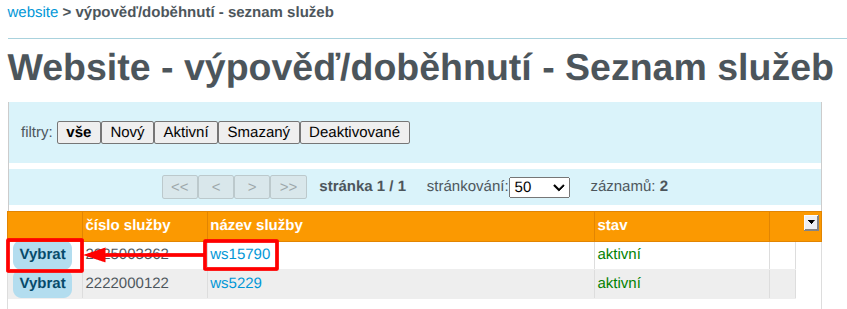
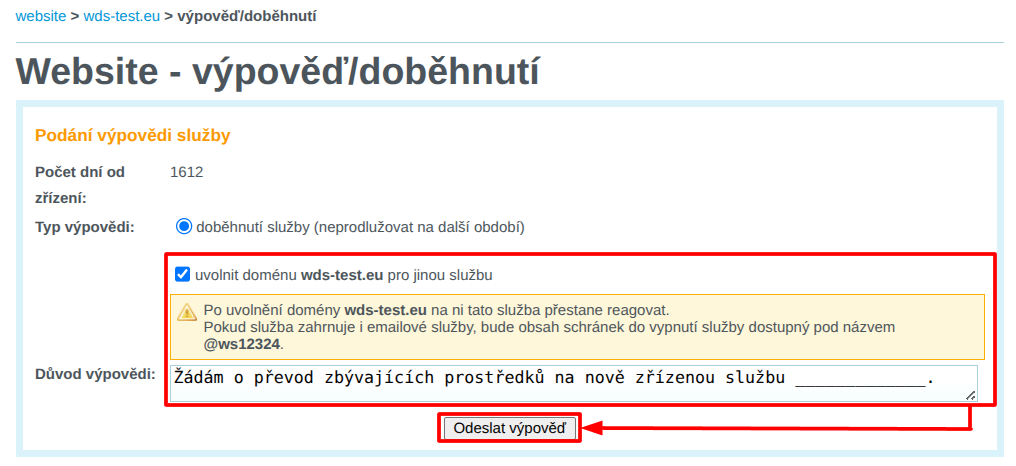
In the cancellation/expiration interface:
- Check the option release the domain for another service
- In Reason for cancellation, enter a request to transfer the remaining funds to the newly created service. Enter the domain name of the service you will be creating.
Order a new service on the original domain:
Done! 🎉
You now have a new service on the original domain, plus an additional bonus period for ending the original service.
Moving emails to a new service
Log in to the customer administration and visit the email migration link for the service:
From the list, select the new service to which you want to move the emails.

Fill in the following details in the form:
- IMAP server: enter
wes1-smtp.wedos.net. If the connection fails, trywes2-smtp.wedos.net. - Migration of new mailboxes: enter pairs consisting of the full name of the original email mailbox (including the current domain) and the password. Separate the name and password with a space; enter additional pairs on separate lines.
If the original service was renamed to the subdomain stary according to the previous chapter, enter the original mailbox with this subdomain name, e.g. info@stary.wds-test.cz.
After filling in the details, click the Continue button.

Done! 🎉
Wait for the mailbox content to be created and transferred. The transfer usually takes several tens of minutes to hours depending on the volume of emails and the load on the migration server.
New mail will now be delivered to the new mailboxes.