
In this guide, you will learn:
- How the Hosting WP trial version works
- How to set up the Hosting WP trial version for a domain
- How to change the trial version to the full version
- Frequently Asked Questions
Hosting WP trial version
The Hosting WP trial version has the following parameters:
- It is free with a new domain order. We do not offer a trial version for a transfer.
- It lasts 30 days. Before the trial period ends, you can change the trial version to the full version.
- The plan is NoLimit WP. You can therefore test both WordPress and email.
Setting up the trial version
The Hosting WP trial version for a domain is also set up with an internal address. More information can be found in the article Hosting WP – Internal website address.
Setting up the Hosting WP trial version is easier than ever. Just leave the default option „WordPress NoLimit WP SPECIAL OFFER 30 days to try (web + emails, part of the domain order)“ checked in the domain order.
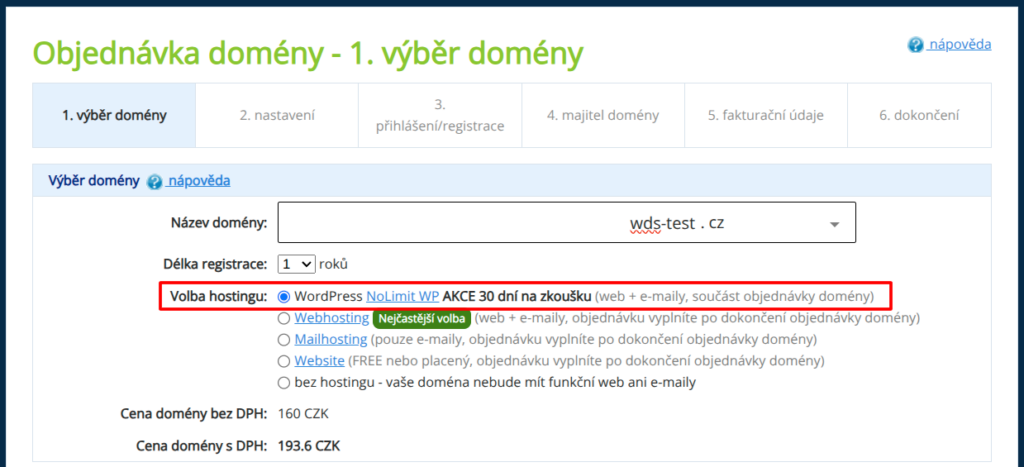
The service will be set up after the domain order is paid, with the following details:
- Billing information: the same as the domain billing information.
- Service operator: the same as the domain owner.
You can change these details during the change from the trial version to the full version, or at any time later in the customer administration.
Changing the trial version to the full version
If you want to keep the Hosting WP service, switch from the trial version to the regular one in time. Follow these steps:
- Log in to the customer administration ⧉.
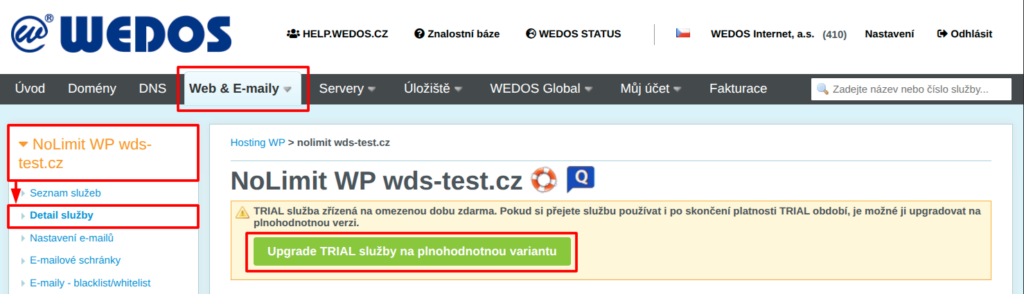
- In the navigation bar, select Hosting services Hosting WP.
- Select the service you want to change to the regular version from the list.
- In the warning box, click the Upgrade TRIAL service to the full version button.
- In the form, check the billing information and service operator information, and edit them if necessary. Check the consents with the terms and click the Order service button.
After submitting the order, the system will immediately issue a payment request and send it to the updated billing email. You can also find a copy in the service billing in the customer administration ⧉.
Discount for a new service
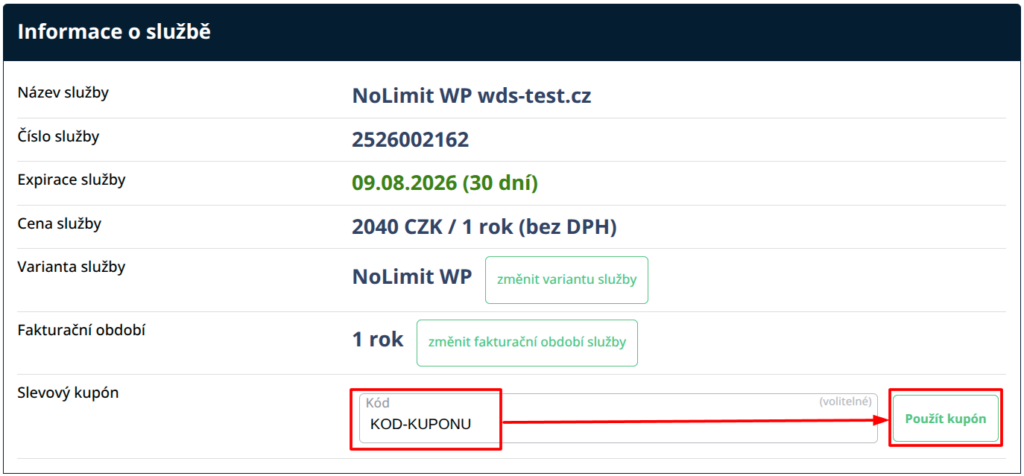
When changing from the trial version to the full version, you can apply discount coupons intended for setting up a new service. Enter the code into the appropriate field in the form for switching from the TRIAL version of the service to the full version and click the Apply coupon button.
Frequently Asked Questions
What is the difference between the WordPress trial version and the full version?
There is no difference in WordPress functionality or performance. The only limitation of the trial version is time, namely those 30 days.
I have a discount coupon for setting up a service, can I also use it when changing the trial version to the full version?
Yes, when changing the trial version to the full version, you can apply a discount coupon for a new service.
If I pay for the upgrade from the trial version to the full version, will I lose the rest of the trial period?
No, by paying for the full version you get one extra year of service use, counted from the expiry date of the trial period.