
This article addresses sending system emails from WordPress. If you want to set up emails for the Hosting WP service (set up or migrate mailboxes, obtain connection details, etc.), look for the corresponding article in the Email category.
In this article, you will learn:
WordPress system emails
WordPress normally sends system emails using PHP. However, on the Hosting WP service, a custom SMTP server is configured, which can better ensure their deliverability. Service emails, including password reset links, therefore come from the address no-reply@mta.XXX.vedos.website, where XXX is the number.
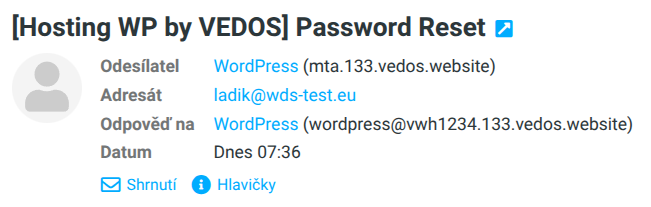
By default, this server sends all WordPress email communication, including contact and other forms, even those configured to use a different (custom) SMTP server.
Custom SMTP server
If you want WordPress on Hosting WP to send emails with your own address (for example from mailboxes of the NoLimit WP or Business WP service), first configure a custom SMTP server using a WordPress plugin, for example WP Mail SMTP ⧉ (third-party plugin). Information about VEDOS mail server addresses can be found in the instructions Email – SMTP, POP3, IMAP.
If you forget to set up a custom SMTP server before proceeding, you risk blocking system emails, including password changes!
If you have a custom SMTP server reliably configured in the selected WordPress plugin, switch to it using the following steps:
- Log in to the WordPress administration.
- In the left menu, select Settings General.
- For Email (SMTP) choose Custom SMTP server.
- Click the Save button.
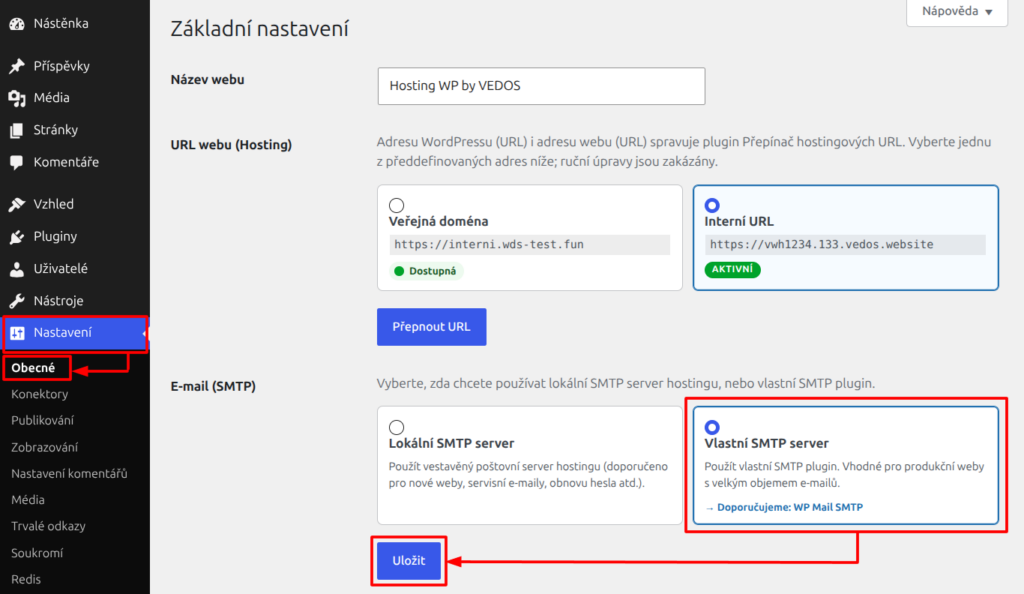
WordPress will now send system and other emails from the configured SMTP server.
Frequently asked questions
What should I do if the custom SMTP does not send mail and I cannot change the WordPress password?
Contact customer support via the form ⧉ and request a switch to the local SMTP server.
Can I configure another provider, not VEDOS, as the custom SMTP server?
Yes, just enter the corresponding server addresses and SMTP login details in the selected WordPress plugin.