
This article describes the procedure for terminating a service. If you want to cancel the entire customer account, follow the instructions Administration – Cancel Customer Account.
If you only want to change your Webhosting plan to a cheaper one, follow the instructions Webhosting – Change Plan. Downgrading WMS, VPS, and WebSite services is currently not possible.
In this article, you will learn:
- How to cancel a new order
- How to terminate / let an existing service run out
- How to cancel a service during the trial period
- How to withdraw from the contract due to repeated technical problems
- Frequently asked questions
Canceling a new order
At present, you can cancel only a domain order. If you want to cancel an order for another service, contact customer support via the form ⧉. Specify the type and name of the service.
You can cancel an unpaid service order. Proceed as follows:
- Log in to the customer administration ⧉.
- In the top menu, select Domains.
- In the list of domains, select the service in the waiting for payment state.
- In the detail, click the Cancel order button.

Service run-out
You can let an existing service run out. By setting the service to run out, you will achieve these changes in the system:
- You will cancel all active invoices for renewal of the service. Run-out does not affect balance invoices.
- You will unsubscribe from emails notifying you of service expiration from WEDOS. The relevant registry may still inform you about the domain expiration.
- For hosting services, you will shorten the time for complete deletion of the service from 30 to 7 days (for dedicated servers from 7 to 0 days) after the expiration date.
Setting a domain to run out does not affect its protection period in any way.
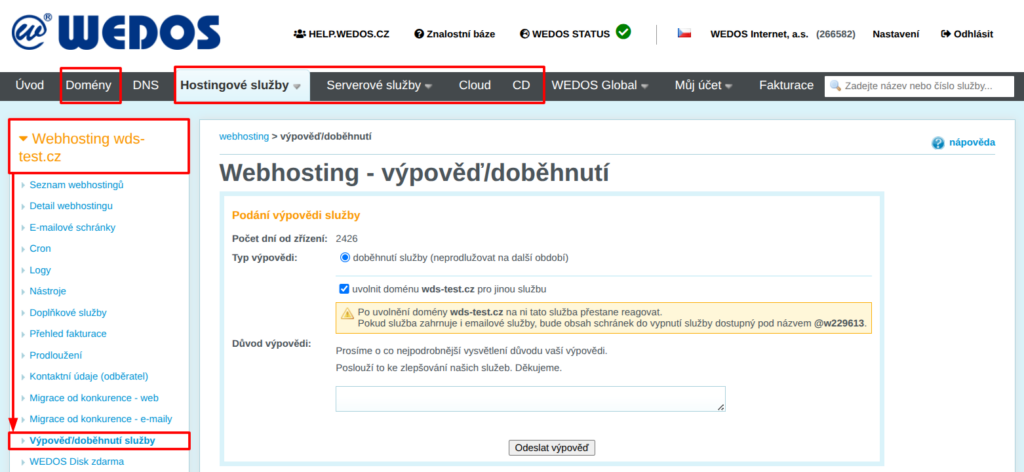
If you want to let a service run out, proceed as follows:
- Log in to the customer administration ⧉.
- In the top menu, select the type of service you want to let run out.
- In the list, select the service to run out.
- In the left menu, select Service termination/run-out.
- For hosting services, fill in the type and reason for termination.
- Click the Submit termination or Run out button.
Services that are running out keep their names until the moment of complete deletion. If you are terminating a service so that you can create a new one with the same name at VEDOS, check the release domain for another service box.
Terminate/run out service:
If you want to cancel the service run-out, proceed with the same steps as for run-out, but in the last step click the Undo run-out button.
Cancellation during the trial period
For all services except domains and dedicated servers, we offer a 7-day trial period.
If you terminate a service according to the instructions above within 7 days of its setup, you can choose cancellation during the 7-day trial period, refund as the termination type.
After sending this type of termination, a VEDOS employee will usually contact you at the billing email within 1 business day and resolve the full refund with you.
Withdrawal due to technical problems
For all hosting services, you have the option to withdraw within 180 days of the service setup due to repeated technical problems on the operator's side. In the termination reason, check the appropriate termination type and in the reason state the times and nature of the technical problems. Usually within 1 business day, a VEDOS employee will contact you at the billing email and resolve a proportional refund with you.
Frequently asked questions
How long does service run-out take?
Run-out of a hosting service usually takes 7 days from the expiration date. Domain run-out is governed by the protection period rules, which are specific to the given domain extension and set by the registry.
I want to terminate the service immediately so that I can create a new one with the same name. How should I proceed?
Before the service runs out, rename it according to the instructions for Webhosting, Mailhosting, or WebSite. If the system does not allow you to enter these changes, contact customer support via the form ⧉ with a request to remove the service name.
How can I cancel a service immediately?
For immediate service cancellation, contact support ⧉. Provide the name of the running-out service and a request for immediate termination.
Immediate termination of domains is charged according to the price list ⧉.
I am terminating a service because I want to set up another type, or combine services. There is still a relatively long period left on the original service. Can I transfer unused funds to another service?
Yes, state the request to transfer funds to another hosting service in the termination form. Make sure that the service to which you are transferring the funds is already set up, and that you state its type and name or number in the form. The transfer cannot be used for domain renewal.