
This article addresses the DNS records of the Hosting WP service. If you want to set up DNS records for a domain, follow the instructions in DNS – Records.
In this article you will learn:
- Which DNS records Hosting WP uses
- How to correctly set up Hosting WP in DNS
- Frequently asked questions
DNS records for Hosting WP
The current DNS records for the Hosting WP service can be found in the service detail in the customer administration. You can find them via the link in the service setup email, or by following these steps:
- Log in to the customer administration ⧉.
- In the navigation bar, select Hosting Services Hosting WP.
- Select from the list the service whose DNS records you want to view.
- In the detail, find the DNS record settings table.
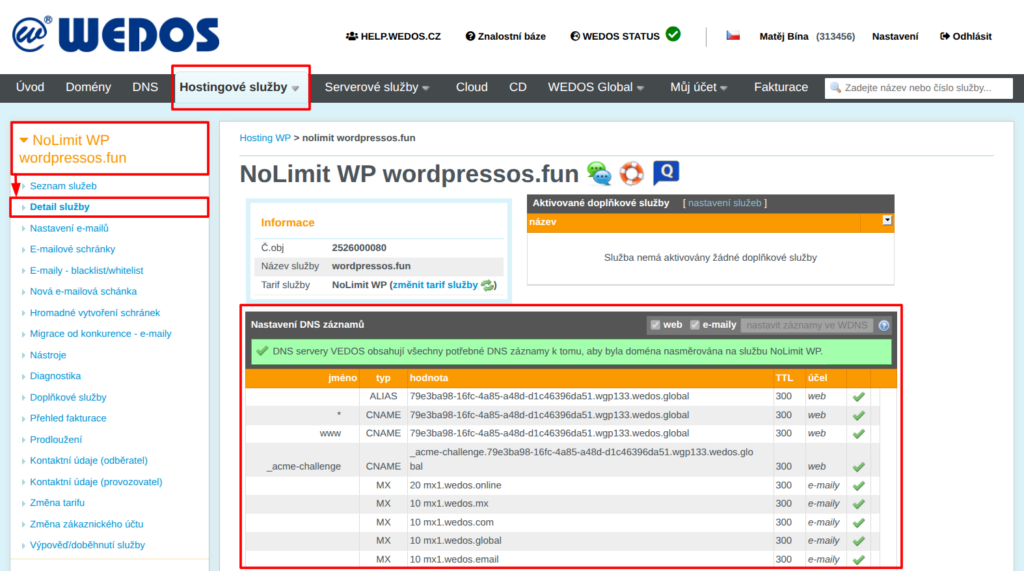
To ensure the Hosting WP service works correctly, set the following DNS records:
Web records
The Hosting WP service has integrated connection to WEDOS.protection ⧉, which provides:
- Advanced protection against DDoS and hacker attacks, including anonymization of the web server IP address.
- Caching and content distribution from servers located around the world.
For this reason, Hosting WP uses either A and AAAA records of the proxy server, or ALIAS and CNAME records pointing there.
A and AAAA records can work only when using WEDOS DNS. They usually have the following form:
Name    TTL    Type    Data
         300    A      ip.4.adresa.1
         300    A      ip.4.adresa.2
*        300    A      ip.4.adresa.1
*        300    A      ip.4.adresa.2
ALIAS and CNAME records are more universal, and the system uses them especially if the domain uses WEDOS DNS.
Name            TTL    Type    Data
                 300    ALIAS  unikatni-wgp-id.wgp123.wedos.global
*                300    CNAME  unikatni-wgp-id.wgp123.wedos.global
www              300    CNAME  unikatni-wgp-id.wgp123.wedos.global
_acme-challenge  300    CNAME  _acme-challenge.unikatni-wgp-id.wgp123.wedos.global
These records serve the following functions:
- Record without a name: ensures the website works on the main domain (without www).
- *, www: ensure the website works on the www subdomain and all others.
- _acme-challenge: allows deployment and renewal of the certificate for HTTPS (Let’s Encrypt ⧉)
MX records
If you want to use e-mails for the Hosting WP service (available for NoLimit WP and Business WP plans), make sure the domain uses the correct MX-type DNS records:
Name    TTL    Type    Data
         300    MX     10 mx1.wedos.mx
         300    MX     10 mx1.wedos.com
         300    MX     10 mx1.wedos.global
         300    MX     10 mx1.wedos.email
         300    MX     20 mx1.wedos.online
For the main domain, enter the records without a name. The number before the record address is the priority.
Hosting WP plans on a subdomain do not support MX-type records. If you want to use e-mails with such a service (also on a subdomain), contact customer support ⧉. Specify the service name.
DNS setup procedure
For easy DNS setup of the Hosting WP service, we recommend setting the domain’s DNS servers (NSSET) to WEDOS according to the instructions in Domains – DNS servers (NSSET).
The procedure differs according to the domain’s DNS server provider:
WEDOS DNS setup
WEDOS DNS can be set automatically from the service detail if the records are located in the same account as the Hosting WP service, or if this account is their authorized user. If you meet this condition, follow these steps:
- Log in to the customer administration ⧉.
- In the navigation bar, select Hosting Services Hosting WP.
- Select from the list the service whose DNS records you want to set.
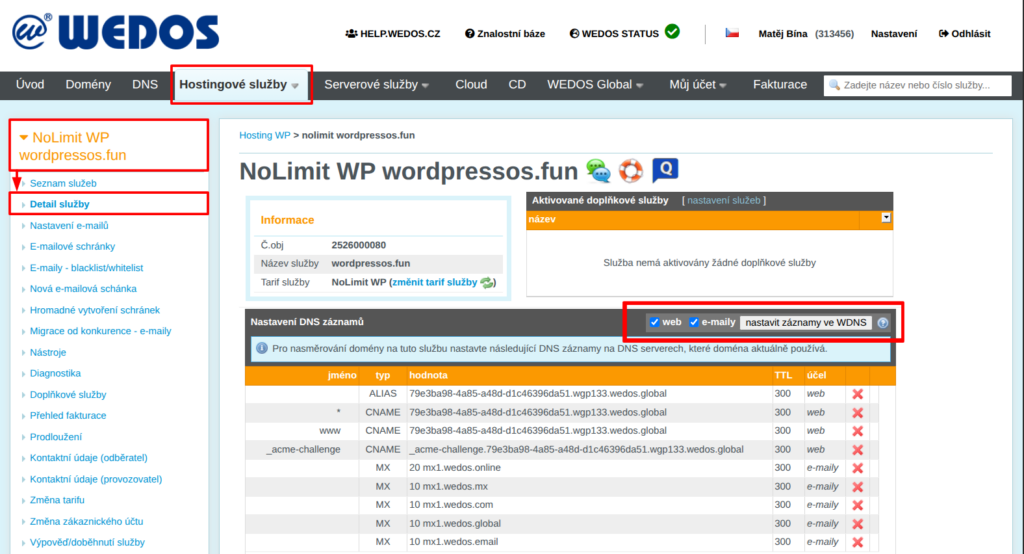
- In the DNS record settings table, check whether you want to set DNS records for the web, e-mails, or both.
- Click the Set records in WDNS button.
If the DNS is not in the same customer account as Hosting WP, and that account is not its authorized user, you can at least temporarily transfer it according to the instructions Services – Transfer between accounts, or Domains – Transfer between accounts using the authorization password.
Setup with another DNS provider
If you cannot change the domain DNS servers (NSSET) to WEDOS, enter the records listed in the service detail with your provider. Keep in mind the following conditions:
- If your DNS provider does not support the ALIAS record for the main domain, try using ANAME or CNAME. If none of these are available, your website can only work on the www subdomain.
- For MX-type records, enter all 5 addresses with the corresponding priorities. If you have other e-mail providers in the records, remove their MX records.
- Wait for the records to propagate. Usual times range from minutes to hours.
Frequently asked questions
I accidentally overwrote the MX records for e-mails at another provider with the automatic setup. How can I restore them?
Find out the correct records from the e-mail service provider, delete the MX-type DNS records for Hosting WP and set different ones. If the original MX records cannot be found, go through the DNS change history.