
In this article you will learn:
- How to choose a domain
- How to check domain availability
- How to go through the domain registration process
- How to register domains in bulk
- Common issues
- Frequently asked questions
Choosing a domain
A domain consists of the name itself (for example moje-domena) and the extension (for example .cz).
When creating a name, we recommend considering the following aspects:
- Match with the purpose of the domain. Does the domain name match the purpose for which you are registering the domain?
- Legal aspects. Is there a risk of disputes regarding similarity of the name to a registered brand or other intellectual property?
- Memorability. Is it easy to remember the domain and type it into the address bar without having to search for it?
When choosing the extension, consider not only its suitability for your needs, but also:
- Price. We guarantee the lowest price for CZ domains on the market, but for other extensions, especially promotional ones, we recommend checking the price for both the first year and the renewal in the complete price list ⧉.
- Support for special characters. Do you want a domain with accents or other special characters? Make sure the chosen extension supports these characters (this is an IDN-capable domain). In our offer, this includes EU domains, gTLDs (COM, ORG, …) and selected nTLDs (FUN, ONLINE, …).
Checking domain availability
If you have chosen a domain, check its availability.
The search engine will display not only the domain with the given extension, but also alternatives in case the domain with the selected extension is already registered.
The prices shown in the search are for domain registration; the renewal price may differ. Current registration and renewal prices can be found in the complete price list ⧉.

If you choose an available domain, continue with registration by clicking the Register button.
.cz domain auctions
Freshly expired CZ domains can now be obtained in an auction held by the CZ.NIC registry ⧉. The auction itself is entirely under the registry’s authority, but you can easily register the won domains with VEDOS — just enter the domain name and the MojeID contact identifier that won the auction.
After filling out the form, proceed as with a regular domain registration.
Domain registration
If you want to get a domain for free as a bonus with a new hosting order, register it directly as part of the order for the given service.
You can register a domain in the registration form ⧉. It has six steps:
The system activates the domain within half an hour after payment is received.
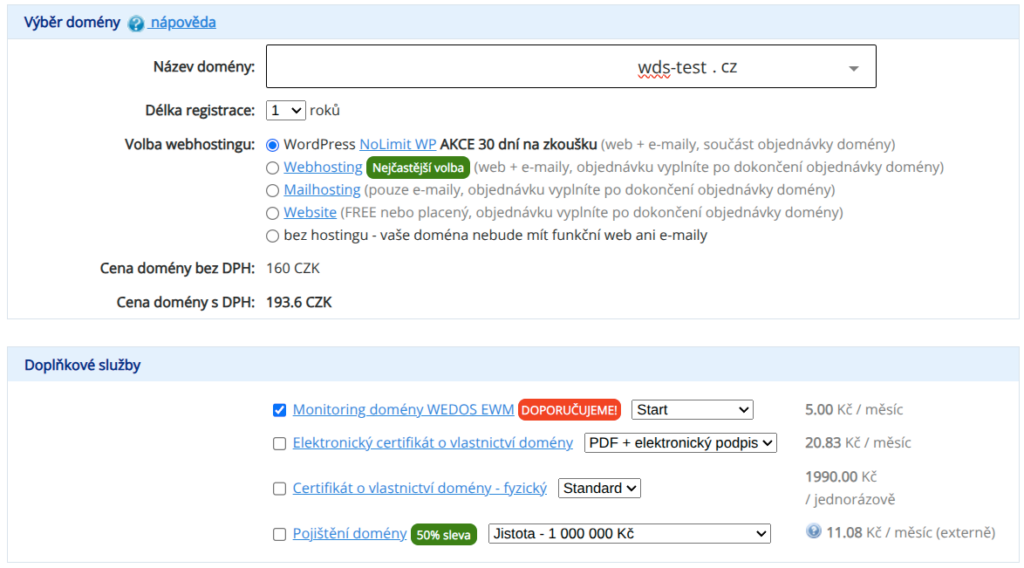
1. Domain selection
Carefully check the entered domain name. A registered (paid) domain with a typo or other error cannot be returned.
In the first step, enter the domain name and choose any related or additional services. Among other things, you can set:
- Registration period. Through the order, you can register domains for at least 1 year, and for 2 to 10 years maximum depending on the selected extension.
- Hosting selection. Choose whether you want to order a trial version of Hosting WP together with the domain order. Alternatively, after completing this order you can proceed to order Webhosting ⧉ , Mailhosting ⧉ or WebSite ⧉, or none at all. This choice is mandatory.
- Additional services. By default, the order for WEDOS EWM domain monitoring ⧉ is checked for a new domain.
- Discount for the 1st year. If you have a discount coupon for a domain order (for example from a promotion with hosting service orders), enter it here.
The price calculation in this step includes all selected additional services for the chosen period and any applied discounts. It does not include any related services, such as Webhosting.
2. Settings
In the second step, choose the DNS server and domain contact settings.
- DNS servers. By default, the domain uses WEDOS DNS servers, but you can also set external DNS servers or NSSET here.
- Contacts. If you have an existing contact with the given registry, we recommend filling it in for easier future management. If you leave the field empty, the system will create a new contact. More information can be found in the article Domains - New contact.
If you are registering a CZ domain won in an auction, fill in the CZ.NIC holder contact (MojeID) that won the domain in this step.
If you are unsure about the settings, leave the default values. You can change both the DNS servers and the domain contact later.
3. Login/registration
In this step, log in or register in the customer administration.
If you are already logged in to the administration, the system will skip this step.
If you have login problems, follow the instructions in Administration - Login issues.
4. Domain owner
In this step, fill in the domain owner details.
If you entered an existing domain contact in step 2, the system will skip this step.
Pay special attention to entering the correct details, especially the domain owner’s email address.
Typos and other mistakes can significantly complicate administration related to the verification and management of the domain owner. The registry may also suspend the domain without compensation if the data are outdated or incorrect.
5. Billing details
Billing details may differ from the owner’s details. The system will send all billing and communication regarding service setup to the specified email address (and only to it).
You can later update the service billing details according to the instructions in Services - Billing details.
6. Completion
In this step, carefully check the entered details, especially:
- Domain name (typos and other errors)
- Domain owner email
- Billing email
At the end of the order, you can choose to pay via Credit Account.
After submitting the order, the system will immediately send you an email with payment details. After successful payment receipt, the service will be set up within 1 hour.
After the domain is activated, or after the owner email is confirmed (generic domains, e.g. COM, ONLINE, …), DNS propagation will take 6 – 48 hours.
Bulk domain registration
Instructions for bulk domain registration can be found in a separate article Domains - Bulk registration.
Common issues
Common problems with domain registration include:
- Error registering a domain won in an auction
- Problematic billing settings check
- Domain not working after registration
- Error in the registered domain name
Registering a domain won in an auction
Problem: An error message appears: Domain domena.cz was won in an auction. The domain may only be registered by the auction winner, who must enter the contact identifier of the owner contact that won the auction.
Cause: The domain must be registered by the contact that is recorded as the auction winner.
Solution: Make sure that in step 2 of the registration you enter the contact of the domain winner (MojeID, in uppercase).

Billing settings check
Problem: The error Billing settings check appears, but the VAT ID is correct.
Cause: The most common source of the error is an outage of the financial entity registry.
Solution: Wait a few minutes and try proceeding to the next step of the order again, or enter the billing details of a natural person and ask us to add the VAT ID to the domain via the contact form ⧉.
Domain not working after registration
Problem: A newly registered domain is active in the administration, but it does not work.
Cause: The DNS servers have not fully propagated, or the domain owner email has not been verified.
Solution: Wait 6 – 48 hours for DNS propagation. If it is a generic domain (COM, INFO, NAME, ONLINE, …), find the email with the link to confirm the domain owner email in the domain owner’s mailbox and follow the instructions in it.
Error in the domain name
Problem: There is a typo or other error in the registered domain name.
Solution: Order a new domain with the correct name. If you also have Webhosting, Mailhosting, or WebSite ordered with the domain, rename this service according to the instructions in the links.
Frequently asked questions
How do I get a domain free with a service?
If you are ordering webhosting, check the free domain in the gifts offer. You then order the domain together with the hosting. For some hosting services we also offer a discount coupon for a free domain, which you can apply in the 1st step of the order for a new domain with the given extension. In both cases, you get the domain free for 1 year. You can find detailed information in this article.
I ordered a domain for a few crowns, but now I received an invoice for much more — what is happening?
We offer domains in promotion at significantly reduced prices for the 1st year of operation. Subsequent periods are charged at the standard domain price. Current registration prices (1st year) and renewals (following years) can be found in the domain price list ⧉.